

After some time getting annoyed by Sashiko giving me feedback on the mailing lists and making me send new versions that I could have saved, and after watching the talk by its author and maintainer, Roman Gushchin, at Kernel Recipes 2026, I decided it was time to run Sashiko locally and catch possible issues before they reach public discussion.
Sashiko is an agentic review system for Linux kernel code changes. It can watch mailing lists and review patches there, but it can also review a series directly from a local kernel checkout. The latter is what I am interested in here: another tool in the local workflow, before sending a patchset to a maintainer or a mailing list.
It is a very simple process, and I am going to show you how to configure and run it with a real example from a patchset I am working on.
Content:
- What is Sashiko?
- Installation and configuration
- Running Sashiko on a patchset
- How much is the damage?
- A powerful but not perfect reviewer
What is Sashiko?
Sashiko is a Linux kernel code reviewer that uses LLMs together with kernel-specific prompts and several review stages. It can look at the purpose of a patch, its implementation and execution flow, and decide to look deeper into things like resources, locking, security, or hardware as needed. That is much more ambitious than just asking a model whether a piece of C code looks alright.
You can find the project and the complete documentation including the stages Sashiko goes through in its official repository. The documentation also describes the different models and providers Sashiko supports. Gemini is the default, but there are many other options, including Claude, OpenAI-compatible providers, Bedrock, Vertex AI, and several CLIs.
Installation and configuration
The current requirements are Rust 1.90 or newer, Git, and access to an LLM provider. Installing Sashiko is as simple as:
cargo install sashiko
Then initialize its configuration:
sashiko init
By default this creates ~/.config/sashiko.toml. The default
configuration uses Gemini, but I already use Copilot CLI, so I configured
Sashiko to use it with Claude Sonnet 5.5 instead. This is my
~/.config/sashiko.toml configuration:
[ai]
provider = "copilot-cli"
model = "claude-sonnet-5.5"
max_input_tokens = 40000
max_interactions = 30

[review]
# Reviews run concurrently up to this many patches. Sized for one developer's
# machine; the daemon's own Settings.toml uses a much larger fan-out.
concurrency = 4
The max_interactions limit is important if you are concerned about API
costs. Sashiko carries out several analysis and verification stages, and
the agent can interact with the code multiple times while checking a
patchset. Thirty was enough for my small series and keeps the cost under
control.
The max_input_tokens setting limits how much context Sashiko sends to
the model in each request. More context can help when a patch depends on
many other files, but it also means more tokens. The concurrency setting
limits how many patches Sashiko reviews at the same time. For this first
test I used the default (4), which was enough for my machine without
starting too many Copilot CLI instances at once.
I would recommend starting with low values for these settings during the first tests, so you do not burn too many tokens. Once you know how Sashiko behaves with your model, patchsets, and machine, you can adapt them to your needs and the resources you have available.
One small detail: the Copilot CLI example does not include the [review]
section, so copy it from the default configuration before using it. I have
sent a PR to fix this trivial issue, so the next users should be able to
simply copy the Copilot CLI configuration and start working with Sashiko.
If you use another provider, follow the corresponding section of the
LLM provider configuration guide.
Running Sashiko on a patchset
Another easy task: just run the sashiko review command from inside a
Linux kernel checkout. Without arguments, Sashiko reviews the latest
commit. To review a series, pass a commit range.
sashiko review HEAD~7..HEAD
For my first test, I ran it on a 7-patch series of short fixes I am working on. Sashiko found one medium-level and one low-level issue.
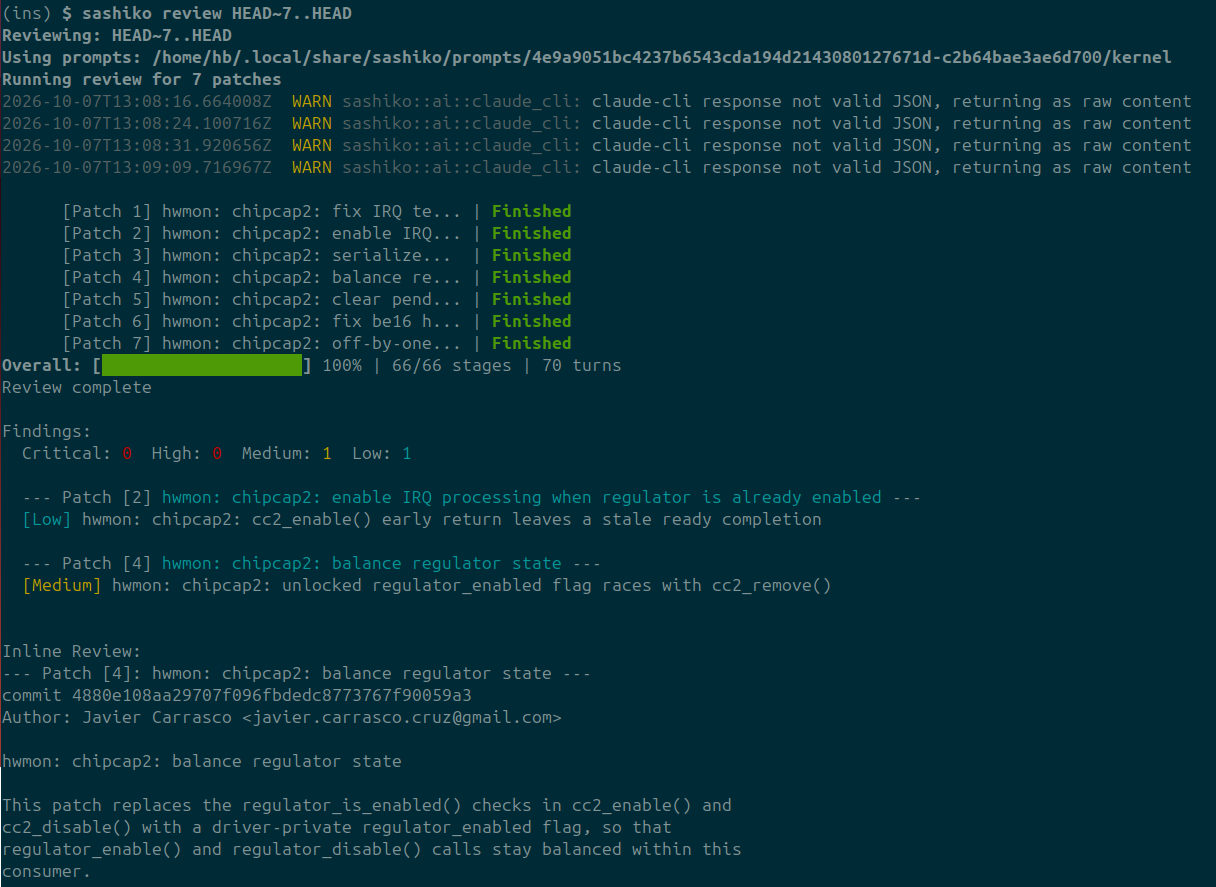
Both of them made sense, so I fixed them by amending one of the commits and adding a new one. That is exactly the kind of thing I prefer to find before sending the series for review. It gives you a comprehensive report of the issues (sometimes a bit difficult to follow, though), and occasionally hints about how to fix them. But it will not fix anything for you, so you will have to analyze the issue by yourself (maybe with some AI support, that is up to you!). After that, I ran Sashiko again on the resulting 8-patch series:
sashiko review HEAD~8..HEAD
This time it found no issues. That does not mean the series is perfect, but it is a much better starting point for the actual human review.
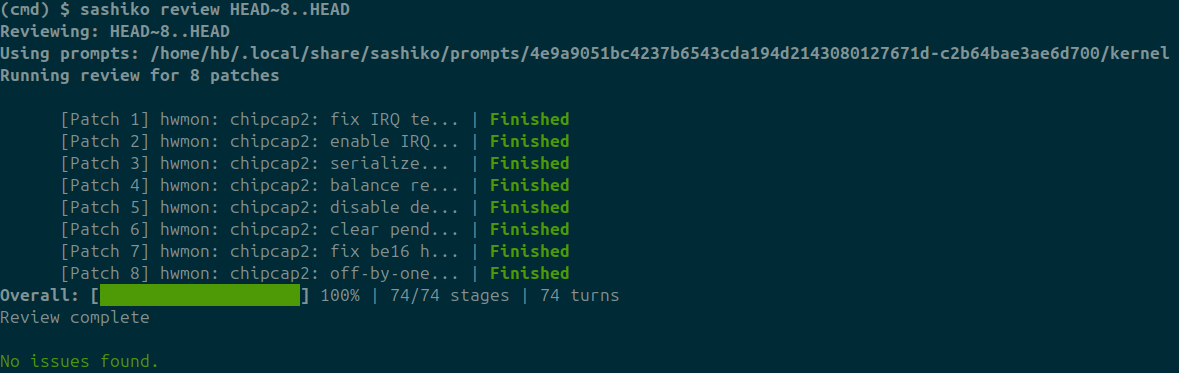
Happy days! At least until I send the patches upstream and the
How much is the damage?
In my case, as you just saw, I ran Sashiko twice. The first iteration,
reviewing 7 patches, cost $5.77. The second one, reviewing the 8-patch
version, cost $6.08. This should give you a rough estimation, but do not
expect the same numbers for every series.
The model (Sonnet 5.5 is not especially cheap), provider, number of patches,
and especially their size will change the result.
My patches were all short fixes, so a large feature or
a long patchset will likely cost more. You probably know already that
the final cost depends on many variables like input caching, the size of
the input and output, etc, etc… but don’t expect it to cost $0.01, and
be careful with your configuration, at least at the beginning, so it
does not cost an arm and a leg 
A powerful but not perfect reviewer
Sashiko has the potential to catch things that human reviewers can easily omit, such as complex race conditions and edge cases. I will definitely keep it in my local workflow from now on.
But it is still a tool, and false positives are possible. Do not blindly apply every suggestion just because an agent reported it. Read the report, understand the code, and decide whether the issue is real. That is still our job.